情景
- 随着我们的代码复杂度的增长, 很多时候我们无法完全避免程序在运行的过程中出错. 很多时候会出现程序在执行某些不重要的代码的时候报错,然后整个程序直接停止.
- 整个项目的代码量过大导致使用 debug 功能修复代码的时候效率过低.
目的
- 帮助程序解决一些报错, 而不是让程序直接停止, 已提高容错率
- 当我们在程序中设计好错误处理的时候, 当程序报错的时候, 我们就更容易找到错误的原因, 提高开发效率
使用 if 来处理异常
if 语句是处理简单的异常的一种方式.
public static int quotient(int num1, int num2) {
    if(num2 == 0) {
        System.out.println("Divisor cannot be zero");
        System.exit(1);
        //这个代码可以直接让程序退出并返回1.
    }
    ···
}
try catch 语句
这里引入一个新的语法, 这个语法的作用是, 当程序在执行 try 语句块中的代码的时候, 如果出现了异常, 那么程序会跳转到 catch 语句块中执行代码.
建议直接将示例代码复制到 IDE 中进行测试, 这样可以帮助你更好的理解这个语法.
class QuotientWithException {
    public static int quotient(int numerator, int denominator) {
        if(denominator == 0) {
            throw new ArithmeticException("Divisor cannot be zero");
            //如果分母为零则抛出异常.
        }
        return numerator / denominator;
    }

    public static void main(String[] args) {
        Scanner input = new Scanner(System.in);
        System.out.print("Enter two integers: ");
        int number1 = input.nextInt();
        int number2 = input.nextInt();
        try {
            int result = quotient(number1, number2);
            System.out.println(number1 + " / " + number2 + " is " + result);
        }
        catch(ArithmeticException ex) {
            System.out.println(ex.getMessage());
            //如果catch到的是算术异常则打印方法中异常记录的消息.
        }
        catch(Exception ex) {
            System.out.println("Exception: " + ex.getMessage());
            //可以使用多个catch来捕获不同的错误
        }
        finally{
            System.out.println("Finally");
            //不管错误是否被catch抓取, 程序都会执行finally语句块中的代码.
        }
        //finally一般用于才捕获错误之后释放资源.
        System.out.println("Execution continues");
    }
}
Exception Types | 错误类型
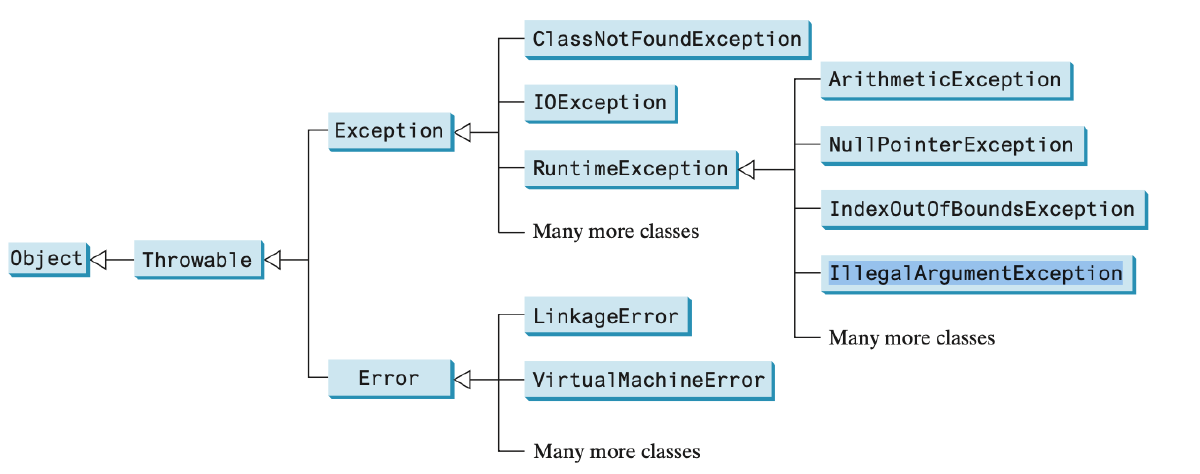
在 Java 中, Throwable 是所有异常和错误的根类。所有通过 throw 抛出的异常必须继承自 Throwable 。其直接子类包括:
Error
LinkageError
- 表示类之间的依赖关系出现问题
- 常见子类包括:
- NoClassDefFoundError - 类定义找不到
- UnsatisfiedLinkError - 本地方法链接失败
- ClassFormatError - 类文件格式错误
- 通常发生在类加载、链接或初始化阶段
VirtualMachineError
- 表示 JVM 本身出现严重问题
- 常见子类包括:
- OutOfMemoryError - 内存耗尽
- StackOverflowError - 栈溢出
- InternalError - JVM 内部错误
- 这些错误通常无法恢复,程序应该终止
栈溢出(Stack Overflow)是指程序调用栈的内存空间被耗尽的情况,属于一种运行时错误。主要特点包括:
- 产生原因 :
- 递归调用没有正确的终止条件
- 函数调用层次过深
- 局部变量占用过多栈空间
Exception
ClassNotFoundException
- 当 JVM 尝试加载某个类但找不到该类的定义时抛出
- 常见场景:
- 使用 Class.forName()动态加载类时
- 类路径(Classpath)配置错误
- 依赖的 jar 包缺失
- 属于检查型异常(Checked Exception),必须捕获或声明抛出
IOException
- 输入/输出操作失败时抛出
- 常见场景:
- 文件读写操作(FileNotFoundException 是其子类)
- 网络通信中断
- 流操作异常
- 也是检查型异
RuntimeException
运行时错误是比较重点的 Exception 类
ArithmeticException
- 算术运算错误,如除以零
- 常见场景:
- 整数除以零
- 浮点数除以零
- 浮点数的无穷大或 NaN
IndexOutOfBoundsException
- 数组索引越界
- 常见场景:
- 访问数组元素时索引超出数组范围
- 数组长度为零
- 数组索引为负数
NullPointerException
- 尝试访问空对象的成员
- 常见场景:
- 对象未初始化
- 方法参数为 null
- 数组元素为 null
IllegalArgumentException
- 传递给方法的参数无效
- 常见场景:
- 方法参数为 null
- 方法参数类型不匹配
- 方法参数值超出预期范围
More on Exception handling | 错误处理进阶
当我们我们定义的一个方法可能会抛出异常的时候, 我们可以在方法的声明中使用 throws 关键字来告诉调用者这个方法可能会抛出什么异常.
method() throws Exception, ..., ExceptionN {
    if (an error occurs) {
        throw new Exception();
    }
}
当你我们使用 try catch 语句的时候, 如果要定义多个 catch, 那么前面的 catch 的异常类型必须是后面的异常类型的子类, 或者同级.
Rethrowing Exceptions | 重新抛出异常
当我们在某处代码中捕获到异常的时候, 但是在此处并无法处理异常, 或者想要在这里先记录异常信息, 方便维护. 我们就能在捕获到异常后, 进行一些操作后将异常重新抛出.
try {
    statements;
}
catch (TheException ex) {
    perform operations before exits;
    throw ex;
}
Defining Custom Exceptions | 自定义异常
当我们想要捕捉 java 中没有定义的异常的时候, 我们可以自定义异常. 我们只需要定一个类继承 Exception 类即可.
class MyException extends Exception {
    public MyException() {
        super();
    }
    public MyException(String message) {
        super(message);
    }
}
The File Class | 文件类
导入类
import java.io.File;
类的构造 和 方法
File file = new File(pathname: String);
// path 可以是一个文件的路径, 也可以是一个文件夹的路径.

File file = new File(parent: String, child: String);
// path 可以是一个文件的路径, 也可以是一个文件夹的路径.

File file = new File(parent: File, child: String);
// parent is file class
- 使用第一种的构造器的时候主要是创建的文件单一, 功能简单, 或者目录明确.
- 对于第二第三种构造器主要是用于需要在某一个目录下进行多次的文件编辑时使用.
file.exists(); // + boolean
file.isDirectory(); // + boolean
file.isFile(); // + boolean
file.length(); // + boolean
file.getName(); // + String
file.getPath(); // + String
file.getParent(); // + String
file.lastModified(); // + long
file.length(); // + long
file.listFiles(); // + File[]
file.delete(); // + boolean
file.renameTO(dest: File); // + boolean
file.mkdir(); // + boolean
file.mkdirs(); // + boolean 与mkdir不同的是, 如果父目录不存在, 该方法也会创建父目录.
PrintWriter 类
导入类 和 构造
import java.io.PrintWriter;

PrintWriter writer = new PrintWriter(file: File);
// 使用File对象创建PrintWriter

PrintWriter writer = new PrintWriter(fileName: String);
// 使用文件名创建PrintWriter

PrintWriter writer = new PrintWriter(outputStream: OutputStream);
// 使用输出流创建PrintWriter
method | 方法
writer.print(value: any); // 打印任意类型数据
writer.println(value: any); // 打印数据并换行
writer.printf(format: String, args: Object...); // 格式化输出
writer.flush(); // 强制刷新缓冲区
writer.close(); // 关闭流
writer.checkError(); // 检查是否有错误发生
有了这些知识, 结合之前学到了 Scanner 类, 我们只需要将构造器的参数改为 File 类传入 Scanner 类就能使用之前所学的方法.
Reading Data from the web
这里包含了一些爬虫知识
暂时不看, 估计不是考试重点